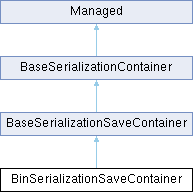
Container for saving data in binary format. More...
Public Member Functions | |
| proto external void | ConfigureCompression (bool enabled) |
| Enable bitstuffing and value compression for data size reduction. | |
| proto external void | ConfigureNameValidation (bool enabled) |
| proto external void | ConfigureObjectSeeking (bool enabled) |
| When enabled it adds meta data to allow StartObject("name") calls to seek to their starting position, making it possible to ignore prior properties or to exit the sub object and re-seek to its start for a retry. | |
| proto external void | ConfigureSkippableObjects (bool enabled) |
| Adds neccessary meta data while writing objects so on load invalid/incomplete object reads can be skipped, while still making reads of the remaining binary stream possible. | |
| proto external bool | SaveToFile (string fileName) |
| proto external ref BinSerializationContainer | SaveToContainer () |
 Public Member Functions inherited from Managed Public Member Functions inherited from Managed | |
| proto external ref Managed | Clone () |
| Return shallow copy of object, or null if it is not allowed (not public constructor) | |
Detailed Description
Container for saving data in binary format.
Member Function Documentation
◆ ConfigureCompression()
| proto external void BinSerializationSaveContainer.ConfigureCompression | ( | bool | enabled | ) |
Enable bitstuffing and value compression for data size reduction.
Leave disable when attempting to debug the data. Enabled by default. Disabled by default in developer builds
◆ ConfigureNameValidation()
| proto external void BinSerializationSaveContainer.ConfigureNameValidation | ( | bool | enabled | ) |
DEVELOPER BUILDS ONLY < Write each named variables name into the data stream to allow validation of correct read order. Enabled by default in developer builds. Parameter will do nothing in other builds.
◆ ConfigureObjectSeeking()
| proto external void BinSerializationSaveContainer.ConfigureObjectSeeking | ( | bool | enabled | ) |
When enabled it adds meta data to allow StartObject("name") calls to seek to their starting position, making it possible to ignore prior properties or to exit the sub object and re-seek to its start for a retry.
◆ ConfigureSkippableObjects()
| proto external void BinSerializationSaveContainer.ConfigureSkippableObjects | ( | bool | enabled | ) |
Adds neccessary meta data while writing objects so on load invalid/incomplete object reads can be skipped, while still making reads of the remaining binary stream possible.
Can be disabled to decrease data size if successful read is guranteed, or loss of the data stream is an acceptable use-case.
◆ SaveToContainer()
| proto external ref BinSerializationContainer BinSerializationSaveContainer.SaveToContainer | ( | ) |
◆ SaveToFile()
The documentation for this interface was generated from the following file:
- GameLib/generated/Serialization/BinSerializationSaveContainer.c
Generated by
 1.13.2