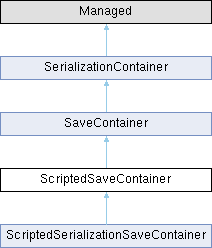
Scripted save container for custom handling of storage.
More...
|
| void | Reset () |
| | Reset the container to re-use for new data.
|
| |
| string | GetDataExtension () |
| | Data extension of the serialized format (e.g. txt, csv, yml) if stored in a filesystem.
|
| |
| string | SaveToString () |
| | Export the data as string to be written to disk etc.
|
| |
| bool | StartObject () |
| | Objects are serialized as sequence of: StartObject() WriteKey("myValue"); WriteInt(42); WriteKey("anotherValue") WriteFloat(13.37); ... EndObject();.
|
| |
| bool | EndObject () |
| |
| bool | StartArray (int count) |
| | Arrays don't have named values and as such are only a sequence of value writes.
|
| |
| bool | EndArray () |
| |
| bool | StartMap (int count) |
| | Maps are key value pairs which are written similar to objects, as sequence of WriteKey(key) + WriteXXX(value); Keys are converted automatically to strings for serialization for cases such as map<int, float>.
|
| |
| bool | EndMap () |
| |
| bool | WriteKey (string key) |
| | Key writer for named properties in objects or map keys.
|
| |
| bool | WriteNull () |
| | Typed value writers.
|
| |
| bool | WriteBool (bool value) |
| |
| bool | WriteString (string value) |
| |
| bool | WriteInt (int value) |
| |
| bool | WriteFloat (float value) |
| |
| bool | WriteVector (vector value) |
| |
Scripted save container for custom handling of storage.
◆ EndArray()
| bool ScriptedSaveContainer.EndArray |
( |
| ) |
|
|
protected |
◆ EndMap()
| bool ScriptedSaveContainer.EndMap |
( |
| ) |
|
|
protected |
◆ EndObject()
| bool ScriptedSaveContainer.EndObject |
( |
| ) |
|
|
protected |
◆ GetDataExtension()
| string ScriptedSaveContainer.GetDataExtension |
( |
| ) |
|
|
protected |
Data extension of the serialized format (e.g. txt, csv, yml) if stored in a filesystem.
◆ Reset()
| void ScriptedSaveContainer.Reset |
( |
| ) |
|
|
protected |
Reset the container to re-use for new data.
◆ SaveToString()
| string ScriptedSaveContainer.SaveToString |
( |
| ) |
|
|
protected |
Export the data as string to be written to disk etc.
◆ StartArray()
| bool ScriptedSaveContainer.StartArray |
( |
int | count | ) |
|
|
protected |
Arrays don't have named values and as such are only a sequence of value writes.
Arrays may be nested, in which case StartArray is called while already inside an array. Sets are considered arrays for serialization.
◆ StartMap()
| bool ScriptedSaveContainer.StartMap |
( |
int | count | ) |
|
|
protected |
Maps are key value pairs which are written similar to objects, as sequence of WriteKey(key) + WriteXXX(value); Keys are converted automatically to strings for serialization for cases such as map<int, float>.
The value type of the map is known one the first value write is called.
◆ StartObject()
| bool ScriptedSaveContainer.StartObject |
( |
| ) |
|
|
protected |
Objects are serialized as sequence of: StartObject() WriteKey("myValue"); WriteInt(42); WriteKey("anotherValue") WriteFloat(13.37); ... EndObject();.
There may be sub-objects/arrays/maps. These will be written using a sequence of WriteKey(...) + StartObject/Array/Map(). Each nested object/array/map will be terminated by EndObject/Array/Map();
◆ WriteBool()
| bool ScriptedSaveContainer.WriteBool |
( |
bool | value | ) |
|
|
protected |
◆ WriteFloat()
| bool ScriptedSaveContainer.WriteFloat |
( |
float | value | ) |
|
|
protected |
◆ WriteInt()
| bool ScriptedSaveContainer.WriteInt |
( |
int | value | ) |
|
|
protected |
◆ WriteKey()
| bool ScriptedSaveContainer.WriteKey |
( |
string | key | ) |
|
|
protected |
Key writer for named properties in objects or map keys.
◆ WriteNull()
| bool ScriptedSaveContainer.WriteNull |
( |
| ) |
|
|
protected |
◆ WriteString()
| bool ScriptedSaveContainer.WriteString |
( |
string | value | ) |
|
|
protected |
◆ WriteVector()
| bool ScriptedSaveContainer.WriteVector |
( |
vector | value | ) |
|
|
protected |
The documentation for this interface was generated from the following file:
- Game/generated/Plugins/Serialization/ScriptedSaveContainer.c


 1.13.2